Saturday, January 14, 2017

Hackday: Albania Walkthrough

Here we are for a walkthrough of the Hackday: Albania and after booting it up in VirtualBox, I ran an NMAP scan that listed only port 22 open and a web server on port 8008. So when we browse to the webserver we are greeted with Mr. Robot...

I have no idea which language that is or what is says so throwing it in google translate gives us: "If I am, I know where to go," and it is in Albanian. Cool.

So, I check the source and there is a comment and I throw that into google translate as well, "Ok, Ok, but not here." Ok, the website is trolling me, ass. So I don't see anything useful from the source so I use dirbuster to see if there is anything else on this server. So, something came back a /js/ directory so I navigated to the page and found this...

The translation is loosely, "Is it right or is directory jerk." So, since /js/ is a directory, I decide to recurse on the /js/ directory with dirbuster and I find /js/external, /js/images/. /js/external has a directory /jquery/ which contains jquery.js and seems to be the external version of the jquery.js file if needed. /js/images has a list of icon sets in different colors. Could be something, but i'm not sure at this point. At this point, I'm kind of stuck so I decide to use another scanner, Nikto, and holy crap things appeared! Why? robots.txt. So I pulled it up on the web server...


A bunch of directories have been disallowed by the robots.txt file, however none of them are trivial to manually type, so I want to find a tool to that will scan these for me. I tried dirbuster and ZAP, but none seemed to do searches based off the robots.txt file. So, I google around and found wfuzz which seemed to do the trick. I had never used wfuzz before, so I fumbled through the usage and eventually saw this on the help file...


Which seemed to be exactly what I wanted (side note: I used wget to get a local copy of the robots.txt file and locally named it robots.txt). Then the results were...


This result is weird, so let's look at it. We found a new page!

So I navigated to /uni.../vulnbank and I see there is a client folder in the vulnbank folder. Again, I follow the path and end up at 'Very Secure Bank' client portal. Looks like some SQL injection is next. After trying some naive attempts at SQL injection, I decided that sqlmap would do this faster and better! Soooo here we go...sqlmap didn't give us great results, but username is vulnerable and it did get us the information that the back end database is MySQL. A good thing to know is that MySQL uses '#' as comments instead of '--' like I was using previously. So, I tried some more naive SQL injection attempts. Nothing worked. COME ON!

Since the username is vulnerable, I figured I'd try and brute force the username with "'#" (single quote, poundsign) appended to the end to trigger the SQL injection vulnerability. I searched kali and google for a good list of usernames and tried some to no avail. Finally, I resorted to the ol' faithful rockyou.txt. It worked. It found jeff and hobson as two users. So I tried both of their usernames appended with '# and they worked!


Ok, there is a submission form on the right side, let's submit a test case and see what happens. Once we submit a test case, we see the message "After we got hacked we our allowing only image files to upload such as jpg, jpeg, bmp etc...". I didn't try and upload an image yet, but obviously I need to try! I'm going to see if I can use the php shell in a jpg trick to get RCE.

AAAAnd boom! Meterpreter shell.


 Now that we have a shell, let's do some recon and escalate privs. First, I like to cat /etc/passwd and look for users...


So we found 'taviso', I decided to also check which groups he is in (meterpreter shell is not very stable but easily obtainable just by refreshing the ticket page in the web app) so I copied it to my local machine and I see the following...

He's in the sudo group! Awesome! So, continuing my reconnaissance, I realized I overlooked something about the /etc/passwd file...it's world writable. what.

Well, that makes everything much easier then. I decided to add my own root user.

 First, I created a password....it was 'password' as you can see. Next, I created the new user 'fabio'.

Since the file was editable, I simply said 'fabio' had a UID of 0 and a GID of 0, which means root privs!

Lastly, all I had to do was switch users to fabio...

This included getting TTY using python3 on the system. Now that I have root privs, let's finish this challenge.


There we go. I hope this helped you out! I realize there are many walkthroughs for this challenge and I hope mine gave you something you might not have received elsewhere while you were learning from this challenge. Full Disclosure: I had issues with meterpreter and getting running the 'shell' command inside of meterpreter because the VM had run out of memory. If you find you're running into a similar issue, try restarting the VM and it should fix that issue.

-Hack Responsibly. Hack Professionally.

Monday, November 21, 2016

Over 1000 Page Views!

This is neither a professional development nor a security related post. I would like to thank everyone that has visited my blog and has benefited from my contributions to the infosec community! I am so excited that my blog has finally reached over 1000 lifetime page views and here is to the next 1000 page views! -Hack Responsibly, Hack Professionally

Vulnhub - SkyDogCon CTF 2016 Walkthrough

Welcome back, here's my walkthrough of the SkyDogCon CTF 2016 as posted on Vulnhub. My thoughts and comments are my own and do not represent anyone else's unless explicitly stated. So, without further ado, let's begin.

Of course, we start out with an nmap scan and get some decent results.


Now, let's check out the web server.

Looks pretty cool, one comment jumped out to me so I made note of it and decided to continue on with fuzzing web directories using dirbuster. I found a forbidden directory called /personnel and it accused me of not coming from an FBI workstation...the nerve...


Nikto didn't return anything useful so, let's check out this comment with a suspicious directory. This looks like a lot of javascript gibberish, but at the very top is a series of letters and numbers. none of the letters are bigger than f so this may be hexadecimal. So, I decode it and it's the first flag!


At this point, I have no other leads to go on for the next flag so, I decide to start investigation the suspicious port I found on my nmap scan. So I connect with ssh and boom! The next flag.


So let's see if we can't crack these two md5 hashes because otherwise I'm not sure what else to do at the moment. The first hash is the hash of the word 'nmap' how convenient, and the second hash is the word 'encrypt'. So I try it as the password and it fails. I then try it as the password for user 'frank' and it fails again. What the hell does 'encrypt' mean? I decided to re-assess every piece of information I had. Port 22 is is closed according to nmap. Port 80 is open and has a webserver. Port 443....is SSL...encrypted! I start immediately going through the webserver. The code is the exact same, so what should I be looking for? What makes SSL encrypted? Well, the encryption keys are stored in private keys and the private key isn't going to be available so the public key must be available and the public key is stored in a certificate! So I pulled up the certificate and holy crap, of course, there is the third flag.


After cracking the third flag it says personnel..HEY! We already found that page! So I pull up the personnel page again and reinvestigate it. Nothing on the source code. No cookies are being stored. It must have to do with my IP address, but i'm not sure what is considered an 'FBI' workstation. Man, how many times do I have to feel like I don't have enough information!

At this point I start clicking through every page I know about searching for 'FBI' and something comes up in the html5.js for temporary support for IE4 Workstations. It's odd that it's specifically IE4, could it be filtering on User-agent string? Let's try. So I found a IE4 user-agent string and added a browser extension to change my user-agent and up came a very different page...


 And if you look near the bottom, we get a flag! There is also a clue, "Clue = new+flag". We crack the flag and it's 'evidence'. Ok, i need evidence of whatever 'new evidence' is. So, looking through the webpage, there are certain numbers that are made bold, 'six, one, 7, 4, 6, 8'. Could this be new evidence? A directory doesn't exist with those numbers, let's try using the clue newevidence. Sure enough, I get a authentication required prompt. So I try hanratty:617468. Fail. I spell out the first two numbers. Fail. So, thinking back to doug.perterson from the html5.js, I don't know "Agent Hanratty's" first name, so I google 'hanratty'. At first I see some James Hanratty stuff, but as I scroll down I see 'hanratty catch me if you can'. Seriously? This is some obscure movie reference?? (I personally hate obscure movie references in CTFs because I have seen almost NO popular movies, my fault, still annoying). Things are making more sense now, I've seen the name Frank Abagnale and FBI and I learn that Agent Hanratty's name is Carl. So the username is probably carl.hanratty. I try this with the numbers still to no avail. Come ooonnnnn.

Now that I know this CTF is based on the movie and the flag name mentions dialogue, I decided to try and make a password list from the script. So I used cewl (which I have a post about on here as well  http://professionalhackerdigest.blogspot.com/2016/09/a-pretty-cewl-post.html) to generate a list and decided to use that list with Burp Suite to attempt to brute force the login. This will take a good long while because of the degradation in service that Burp Suite provides as a feature for the free version.


I had to test the original list and I added all lowercase, all uppercase, and first letter capitalized to finally find the password, "Grace".


The fifth flag is "panam". There are two more links on this page. One shows an image and the other shows a pdf. The image is a picture of a river and a beach with some people, some houses and a small castle in the background. I downloaded it and ran exiftool against it, but nothing interesting came up. The pdf is an invoice from Hetzl and Associates for "Encryption Consultation Project" done for Agent Earl Amdursky of the FBI and some guy named Stefan Hetzl actually did the work. So after searching for "Stefan Hetzl encryption" on google, the tool StegHide comes up. *Lightbulb* the picture we downloaded has an embedded message with StegHide.


As you can see in the picture, I had to download steghide (apt-get install steghide) and then followed the man page to successfully extract the image. The passphrase was the previous flag "panam", makes sense in the context of this CTF. Interestingly enough, the flag is decrypted for us here and it says "ILoveFrance". This looks like a password to me, so i'm going to keep that in mind going forward. There is also a clue "iheartbrenda" all lowercase. Possibly a directory? Nope, not a directory. Neither is "ILoveFrance".

Ok, so, we now have what looks like a password or maybe two (because we know they're not directories) and the flag title references 'the fastest man alive'. Luckily, i know that's a reference to The Flash (comic book character knowledge ftw) and I decided to go through the script looking for 'fastest man alive' and nothing. So I googled 'fastest man alive the flash' and then it hit me, barry allen, his pseudonym. So I checked the script for 'barry allen'. Again nothing! So, back to the google AGAIN. I searched 'barry allen catch me if you can' and there were numerous references to the movie and Carl is convinced that Frank is named Barry Allen. Could this be a username and could we have a password for the SSH connection we've been waiting for???

I tried a few combinations of Barry Allen (barry, barry.allen, barryallen) (of course the last one worked) and the password was 'iheartbrenda' instead of the 'ILoveFrance'. Works for me!


The 7th flag is in the home directory as flag.txt and the md5 is 'theflash'.

So, there is also a security-system.data file in the home directory. After running file on security-system.data we can see it's a zip archive so, I scp it to my kali box to analyze it further. I am able to unzip and expand it, but now running file on it, it just says it's data. Next, I run strings on it and there seem to be a lot of Windows API calls. As I scroll through the output of strings I see well known outputs from the windows cmd.exe prompt and I realize the file is 1 GB in size and has a lot of windows functionality; this is probably a windows image!

I'm not great with volatility, but I decide to try my luck and use it to open up this potential windows image. First I run the imageinfo plugin and confirm that it is indeed a windows image. Then I run screenshot and I just barely see something in one of the pictures, it has 'code.txt' open in notepad and a cmd.exe prompt behind it.


So I immediately start looking for this code.txt and processes with cmd.exe. I found the processes, but I found something better quickly after! There is a notepad plugin for volatility that displays the text from a notepad.exe currently running. It's a series of hex values as you can see below:


xxd wasn't giving me all of the answer, but I knew the answer HAD to be in there so I tried a different hex convertor and sure enough, it prints out the last flag,


I would like to thank the author James Bower for creating this awesome CTF and anyone who helped him. I would also like to thank Vulnhub.com for hosting this. I hope you enjoy this walkthrough. -Hack Responsibly, Hack Professionally.

Thursday, November 17, 2016

Vulnhub - IMF Walkthrough

Welcome! This is my walkthrough of the IMF challenge hosted on vulnhub.com. The actual url to this exact machine is: https://www.vulnhub.com/entry/imf-1,162/

And now....onto the walkthrough....

After loading the image into VirtualBox, it showed up as 192.168.6.101 on my local network.

First, I decided to scroll through the source code on the web pages, which is always a decent first thing to do. Sometimes, it can lead to hidden folders that were simply commented out, potentially interesting folders beyond /images, /css, and /js, or in this case the first flag!

 The flag was base64 encoded and after decoding it using linux-fu (echo <flag> | base64 -d) it read out 'allthefiles' (no quotes). Next, I tried browsing to the /allthefiles folder, but to no avail. Then I ran a dirbuster scan with a wordlist to see if there was a hidden directory I needed to find, but nothing jumped out there either. Then I noticed that there were some javascript files that had names that were base64 encoded so I tried to decode them and got part of flag2 in the output, so I concatenated the files together to create the next flag.


Now to base64 decode flag2...and we got 'imfadministrator' (no quotes). Again, I tried using the flag as path and this time it got us to a login prompt.

After trying imf:administrator as the first pair of credentials, I saw the response 'Invalid Username' so I tried admin, administrator, root and got the same response. Then I remembered the contacts on the contact.php page. I tried all three usernames (the first part of the email addresses) and rmichaels was the only one that returned 'Invalid Password'. Next, I took a look at the source code and the first thing I saw was a huge comment "<!-- I couldn't get the SQL working, so I hard-coded the password. It's still mad secure through. - Roger -->" (no quotes). Ok, no SQLi, but onto password guessing!

After password guessing for awhile (longer than I care to admit) I started googling for things along the lines of 'php password bypass'. Lots of SQLi pages came up but another page came up that said something along the lines of 'PHP password bypass for CTF'. *strokes beard*. After reading about this, apparently PHP does not do well with type conversions when comparing to zero and we can alter the POST request to send an array object instead of a string object for the password field and because of the type conversion issues, the php page will incorrectly allow us access.


Flag3 simply states 'continueTOcms' so I clicked on the link to continue my adventure. I found the CMS and poked around for a little bit. Nothing interesting in the source, no exploitable LFI that I could see. Then I tried SQLi on the pagename parameter. Bingo! After some initial failures, I finally realized that I wasn't including my PHPSESSID cookie with my sqlmap usage. I finally got my command:


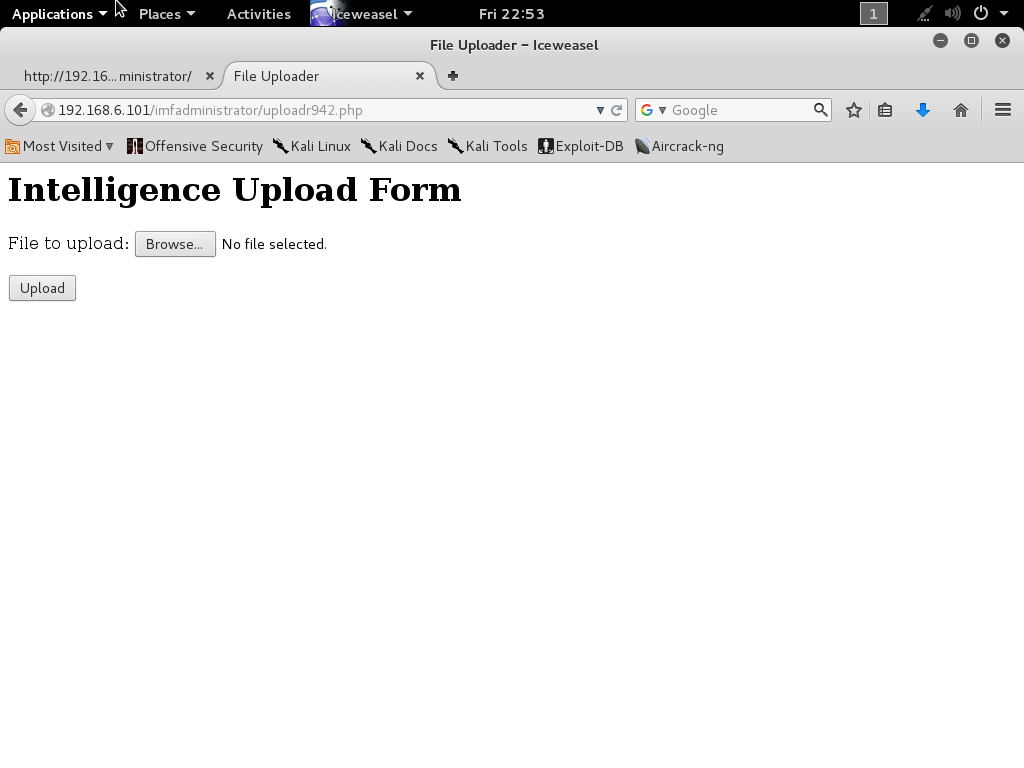
The dump showed a new page that we hadn't seen before 'tutorials-incomplete' (no quotes). This page has a picture with a QR code. After scanning it, I got the fourth flag. The flag was 'uploadr942.php' so I navigated to that page next.


First I tried to upload a text file and got an invalid file type error. After trying a couple different formats, I finally found the jpg was accepted as a valid filetype. There isn't any information on where the picture was uploaded to so, I thought I'd try the obvious options /images and /uploads. /images returned a blank page and /uploads was forbidden. So it exists? Going back to the result there is a comment in the source code that didn't exist before; unique hash? Possible filename? The /images/<hash>.jpg was not found. /uploads/<hash>.jpg worked! Holy crap! Ok, so now I needed something I could use to execute code with so I grabbed a webshell included in Kali Linux and attempted to upload the webshell renamed with the .php.jpg extension. Unfortunately, this didn't work because 'CrappyWAF detected malware. Signature: fopen php function detected'. Well screw you too IMF.

The CrappyWAF also detected the 'system' function. ....seriously....and exec too....and shell_exec....and passthru...COME ON!

I found a stackoverflow page that listed out different ways to execute code via php and BACKTICKS seems to be working. I edited my php-webshell to use backticks instead of system/exec/whatever calls and I only got 'Error: Invalid file data' instead of CrappyWAF errors. Two steps forward, one step back. Now, how to make it look like valid data...

After trying for a couple hours I decide that jpg files are not going to work and I determine that png, bmp, and gifs are also acceptable formats. I used a technique I found online to write the magic number "FF D8 FF E0" to a fake gif file and then append straight php to the fake file. This FINALLY allows us to achieve code execution on the machine.


HAHAHAHA FINALLY! I can cat the fifth flag and move forward...

The fifth flag reveals the phase 'agentservices'. Hmmm....after perusing around the box for a bit, I found ssh listening on port 22 and an unknown service listening on port 7788. (I found out later that the agent services was referring to the .htaccess file that allows us to execute php from a .gif). I also found /usr/local/bin/agent and /usr/local/bin/access_codes while looking for files related to 'agent' on the machine. The /usr/local/bin/agent turns out to be an ELF executable and the access_codes file says 'SYN 7482,8279,9467' which looks like port knocking ports to me.

I am able to port knock the machine using nmap and then I can simply nc to the machine on port 7788 and the service is now available! So, from our php webshell I can 'cat' the contents of the 'agent' executable, but I need to find out what the Agent ID means.

First I copy the agent executable back to my local workstation and I run strings, nothing jumps out about the Agent ID but, I can see there are menu options that include Extraction Points, Request Extractions and Submitting a report. In addition, there are numerous cities and places, i'm assuming, to request an extraction.


After running into some issues and desiring a more robust prompt, I switched over to meterpreter and executed an msfvenom payload via the php backdoor shell and now have a meterpreter shell on the machine.


Finally, I am able to run ltrace on the agent executable and we can easily see the 'strncmp' call made with my provided value 'a' and the actual value needed '48093572'.


Ok now it looks like we have access to this executable and from our previous recon on the box we know this executable is running as root so, I think it's time to design a BUFFER OVERFLOW!!! *epic music*

So after a little fuzzing, I found that the Report (option 3) is able to be corrupted with a string length of 1024 "\x90"s so now, I need to find where the buffer overwrites EIP. To do this we can use pattern_create.rb. We found where EIP crashes and determined that the offset is 168 bytes into the buffer. To confirm this, we edit bytes 168-171 (inclusive) to be unique and when the program crashes, we should see our exact bytes that caused the application to crash.


Now that we've confirmed we can write to EIP, let's see which registers are also overwritten. It looks like eax is holding a pointer to an array of data that was overwritten by our pattern so let's investigate that more thoroughly.


So again, we used pattern_create.rb to create a pattern and put it into the application, and then we use pattern_offset.rb to calculate the offset of the buffer! Which is....


...offset 0? That seems awfully nice. Now, I need to find someway to get code execution to eax. Fortunately, there is a site called ropshell that you can upload a binary to and it will give you back some options including one for 'call eax' located at offset 0x00000563. You need a little more computer architecture knowledge to know that this will be located at 0x08048563 in memory (most linux executables are loaded at base address 0x08048000). Lastly, we just need shellcode which is easily generated by msfvenom. Now we have the exploit!


Let's try and see if it works! So, this specific script didn't work, but the format stayed the same. I had to add some time delays and I switched from meterpreter shellcode to regular shellcode. Here is the actual script that worked followed by my root privs.


Well, now all that remains is to see the final flag and wrap up this walkthrough! Drum roll please......................


This was an awesome exercise and I'd like to give credit to all the website I used while researching how to exploit this box. I'd also like to say I did compare my walkthrough to the other walkthroughs already posted on Vulnhub.com and it was very fun to see alternate and similar techniques used. All thoughts and comments are the authors and do not represent the thoughts or comments of anyone else. I hope you enjoyed this walkthrough! -Hack Responsibly. Hack Professionally.

Saturday, October 29, 2016

Getting to the root@hostname:~# of the problem

What is privilege escalation?

Let's look at the subject in a less technical fashion first. What does it mean to elevate one's privileges? It's being able to do something that you do not have privileges for, for example: The wife of a powerful CEO can elevate her privileges by convincing her husband to do something for her that she normally couldn't do. This could be money, power, valuable items, etc.

In terms of hacking or computer security (two sides of the same coin) we either need a program to execute our own code with higher privileges or we need to prevent any program from executing user-supplied code at higher privileges than the user is allowed; or more specifically, the hacker is allowed.

Whenever someone asks about or googles for 'linux privilege escalation' there is one blog that everyone cites: https://blog.g0tmi1k.com/2011/08/basic-linux-privilege-escalation/. This blog post is very thorough and hits on an important point; Enumeration is key. You only need one avenue by which to raise your privileges and there are many, many different ways to do so.

I recommend going through g0tmi1k's blog and understanding what each command does and how it can be used for privilege escalation. Once you understand the methodology, there are a few things I personally recommend when attempting to escalate your privileges.

  1. 'sudo su root' - This is by far the easiest privilege escalation I've ever seen but, when you have sudo privileges you are simply using them to change your user to the root user and boom! You're root.
  2. Cracking root user privileges. If you don't believe that random passwords are used for root accounts, then that means a user set the root password and can potentially be brute forced. However, this is obnoxiously noisy, just for your reference. 
  3. Use the Linux Exploit Suggester built into Kali Linux to find exploits based on the kernel version. https://github.com/PenturaLabs/Linux_Exploit_Suggester
  4. Use the Linux Privilege Checker which automates G0tmi1k's blog enumeration process and suggest potential exploits. https://www.securitysift.com/download/linuxprivchecker.py
Lastly, the difference between a script kiddie and a professional hacker will be the depth of understanding of these scripts, methodologies, and privilege escalation exploits. If one doesn't work on a kernel it says it should work with, learn why.

Hack Responsibly. Hack Professionally.