Welcome to the new year! 2017 = 0x7E1 = 0111 1110 0001, just in case you were curious. So today, I wanted to discuss 5 fundamental skills that every hacker should master. I use the term hacker loosely because these apply to both offensive and defensive experts alike. I'm going to count down in reverse order, ready?
5. Port Scanning
This is the bread-and-butter of compromising a computer. After you have completed your information gathering phase and determined which computers are 'in-scope' for your purposes then you need to figure out where the weak points of the computer are. Hint: it's the open ports. Ports can tell us so much about the computer we may not have gathered during the previous phase like, which operating system is running? which services are running? and sometimes tell us the overall use of that specific computer (Mail server, DNS server, employee desktop, etc.). Being able to scan ports effectively, quickly, and quietly is the BEST way to attack a computer. On the defensive side, making sure only the services you need running are running, making sure the services are up-to-date including patches if previous vulnerabilities were discovered, and being able to detect network scanning is paramount for the defense. NMAP is the big name in port scanning, but you should become familiar with other port scanning tools such as unicornscan, masscan, p0f, Angry IP Scanner, and hping3 as a couple of examples.
4. Networking Models
In general, networking models are an academic exercise, but they do serve one purpose while learning; a complete understanding of the interchange of information between computers. The Department of Defense (DoD) model is the most useful in my opinion. It has four layers (Network Access Layer, Internet Layer, Host-to-Host Layer, and Application Layer). The first layer (Network Access) takes into account the physical exchange of information across wires or via a wireless medium along with the transition from physical to virtual information. The next layer (Internet) is what connects computers together across the internet. The IP protocol is most commonly used nowadays and in order to use the IP protocol, IP addresses are assigned to each computer and routers are used to send information from one network to a new network based on IP addresses. The third layer (Host-to-Host) is about which language is used by each computer to communicate. There are two main options (TCP and UDP) and they can be likened to a civil conversation and a stock market trading floor. TCP is session-oriented and has reliable transmission so information is communicated effectively and completely at the expense of speed. UDP is almost the exact opposite, it yells things across the internet hoping the correct computer hears it and responds appropriately. Lastly, we have the application layer. This is where HTTP traffic, FTP traffic, SMB traffic, and all other types of application send data over TCP or UDP over IP (mostly) over wired or wireless mediums from one computer to another. Even if you don't understand the deep technical details of how each layer works, you should be familiar with how these work in general because in order to exploit (offensive) and prevent exploits (defensive) you need to understand how the information is communicated.
3. Programming from Assembly to Python
Programming is SO incredibly important! I cannot stress this enough. How are operating systems made? by programming. How are programs/software made? by programming. How are exploits made and used? by programming. Nowadays there are so many different ways to learn how to program from free online classes to free Android/iOS apps to youtube videos. In fact, here you go! I recommend learning the basics in a high-level language such as PHP, Java, or C#. Once you have mastered one of those languages move to Python because you will be using this language A LOT. Once you've mastered Python drop down to C and assembly. You can spend the rest of your life mastering C and assembly plus, I think they are the least intuitive for people learning to become hackers. If you're already familiar with programming in general focus on Python, C, and assembly. The understanding of these languages are what separates a good hacker from a great hacker.
If you're a purist or traditionalist, you can certainly go backwards. Start at assembly and understand what an Op Code is and what it does, you'll learn about registers and memory addresses and you can certainly expect your head to hurt afterwards, but everything you learn afterwards is just an abstraction on top of assembly. After assembly, you will learn to appreciate what C can do for you and if it can't do something you need, you can always force assembly upon it! Python will allow you to script things out instead of writing a program and compiling it every time. Use python to augment and script your C and assembly work.
Full disclosure: I did not recommend every program language that you could use and yes, these are the languages that I am personally biased towards. You could learn Ruby, you could learn Perl, you could learn C++ or ,Net or any other. Each have their benefits and you should be familiar with all of them, but you will end up enjoying a select few languages based on personal preferences.
2. Information Gathering
Even though this is the first step in the hacking methodology, it makes number 2 on our list and you'll see why. This step is so critically important because the more information you can gather the more likely you are to accomplish your goals. You need to find domains, IP addresses, email addresses, physical locations, what services they provide, what services the don't provide, can you exploit them technically, socially, or physically? After gathering all this information, the actual hacking becomes laying down one train track after another to connect yourself straight into your target. Lots of people skip this step (including myself sometimes) and later when the individual finally exploits their target, it's as a result of additional information gathering. You can never have too much information especially in this day and age where computers can store and process most of it for you. DO NOT SKIP THIS STEP.
1. Curiosity
The single best skill a hacker can have is curiosity. The insatiable desire to learn about the way something works. This is how hackers find zero-day exploits: they know your product better than you do. They learn about your product, study your product, use your product and then exploit your product. This curiosity does not stop at just exploitation. It also extends to offensive, if you're on defense and defense, if you're on offense. The only way to beat the adversary is to understand the adversary better than they understand themselves. If you're on defense you understand how an attacker tries to exploit systems and you harden them. If you're on offense, you understand how defense hardens systems and work around those patches, configurations, and hardening strategies. I would further posit that a true hacker is curious about all things and not simply what he or she knows best. Some of the best findings over the years have come from the intersection of previously unrelated notions, ideas, and fields of study. This skill must be mastered above all else. Be curious and if you're not curious about something, be curious about why you're not curious.
These are the 5 fundamentals every hacker should master, offensive or defensive. Take these to heart and use them to better yourself.
-Hack Responsibly, Hack Professionally.
Showing posts with label python. Show all posts
Showing posts with label python. Show all posts
Sunday, January 15, 2017

Thursday, November 17, 2016
Vulnhub - IMF Walkthrough
Welcome! This is my walkthrough of the IMF challenge hosted on vulnhub.com. The actual url to this exact machine is: https://www.vulnhub.com/entry/imf-1,162/
And now....onto the walkthrough....
After loading the image into VirtualBox, it showed up as 192.168.6.101 on my local network.
 First, I decided to scroll through the source code on the web pages, which is always a decent first thing to do. Sometimes, it can lead to hidden folders that were simply commented out, potentially interesting folders beyond /images, /css, and /js, or in this case the first flag!
 The flag was base64 encoded and after decoding it using linux-fu (echo <flag> | base64 -d) it read out 'allthefiles' (no quotes). Next, I tried browsing to the /allthefiles folder, but to no avail. Then I ran a dirbuster scan with a wordlist to see if there was a hidden directory I needed to find, but nothing jumped out there either. Then I noticed that there were some javascript files that had names that were base64 encoded so I tried to decode them and got part of flag2 in the output, so I concatenated the files together to create the next flag.

Now to base64 decode flag2...and we got 'imfadministrator' (no quotes). Again, I tried using the flag as path and this time it got us to a login prompt.
 After trying imf:administrator as the first pair of credentials, I saw the response 'Invalid Username' so I tried admin, administrator, root and got the same response. Then I remembered the contacts on the contact.php page. I tried all three usernames (the first part of the email addresses) and rmichaels was the only one that returned 'Invalid Password'. Next, I took a look at the source code and the first thing I saw was a huge comment "<!-- I couldn't get the SQL working, so I hard-coded the password. It's still mad secure through. - Roger -->" (no quotes). Ok, no SQLi, but onto password guessing!
After password guessing for awhile (longer than I care to admit) I started googling for things along the lines of 'php password bypass'. Lots of SQLi pages came up but another page came up that said something along the lines of 'PHP password bypass for CTF'. *strokes beard*. After reading about this, apparently PHP does not do well with type conversions when comparing to zero and we can alter the POST request to send an array object instead of a string object for the password field and because of the type conversion issues, the php page will incorrectly allow us access.

 Flag3 simply states 'continueTOcms' so I clicked on the link to continue my adventure. I found the CMS and poked around for a little bit. Nothing interesting in the source, no exploitable LFI that I could see. Then I tried SQLi on the pagename parameter. Bingo! After some initial failures, I finally realized that I wasn't including my PHPSESSID cookie with my sqlmap usage. I finally got my command:

The dump showed a new page that we hadn't seen before 'tutorials-incomplete' (no quotes). This page has a picture with a QR code. After scanning it, I got the fourth flag. The flag was 'uploadr942.php' so I navigated to that page next.

First I tried to upload a text file and got an invalid file type error. After trying a couple different formats, I finally found the jpg was accepted as a valid filetype. There isn't any information on where the picture was uploaded to so, I thought I'd try the obvious options /images and /uploads. /images returned a blank page and /uploads was forbidden. So it exists? Going back to the result there is a comment in the source code that didn't exist before; unique hash? Possible filename? The /images/<hash>.jpg was not found. /uploads/<hash>.jpg worked! Holy crap! Ok, so now I needed something I could use to execute code with so I grabbed a webshell included in Kali Linux and attempted to upload the webshell renamed with the .php.jpg extension. Unfortunately, this didn't work because 'CrappyWAF detected malware. Signature: fopen php function detected'. Well screw you too IMF.
The CrappyWAF also detected the 'system' function. ....seriously....and exec too....and shell_exec....and passthru...COME ON!
I found a stackoverflow page that listed out different ways to execute code via php and BACKTICKS seems to be working. I edited my php-webshell to use backticks instead of system/exec/whatever calls and I only got 'Error: Invalid file data' instead of CrappyWAF errors. Two steps forward, one step back. Now, how to make it look like valid data...
After trying for a couple hours I decide that jpg files are not going to work and I determine that png, bmp, and gifs are also acceptable formats. I used a technique I found online to write the magic number "FF D8 FF E0" to a fake gif file and then append straight php to the fake file. This FINALLY allows us to achieve code execution on the machine.

HAHAHAHA FINALLY! I can cat the fifth flag and move forward...
 The fifth flag reveals the phase 'agentservices'. Hmmm....after perusing around the box for a bit, I found ssh listening on port 22 and an unknown service listening on port 7788. (I found out later that the agent services was referring to the .htaccess file that allows us to execute php from a .gif). I also found /usr/local/bin/agent and /usr/local/bin/access_codes while looking for files related to 'agent' on the machine. The /usr/local/bin/agent turns out to be an ELF executable and the access_codes file says 'SYN 7482,8279,9467' which looks like port knocking ports to me.
I am able to port knock the machine using nmap and then I can simply nc to the machine on port 7788 and the service is now available! So, from our php webshell I can 'cat' the contents of the 'agent' executable, but I need to find out what the Agent ID means.
First I copy the agent executable back to my local workstation and I run strings, nothing jumps out about the Agent ID but, I can see there are menu options that include Extraction Points, Request Extractions and Submitting a report. In addition, there are numerous cities and places, i'm assuming, to request an extraction.

After running into some issues and desiring a more robust prompt, I switched over to meterpreter and executed an msfvenom payload via the php backdoor shell and now have a meterpreter shell on the machine.

Finally, I am able to run ltrace on the agent executable and we can easily see the 'strncmp' call made with my provided value 'a' and the actual value needed '48093572'.

Ok now it looks like we have access to this executable and from our previous recon on the box we know this executable is running as root so, I think it's time to design a BUFFER OVERFLOW!!! *epic music*
So after a little fuzzing, I found that the Report (option 3) is able to be corrupted with a string length of 1024 "\x90"s so now, I need to find where the buffer overwrites EIP. To do this we can use pattern_create.rb. We found where EIP crashes and determined that the offset is 168 bytes into the buffer. To confirm this, we edit bytes 168-171 (inclusive) to be unique and when the program crashes, we should see our exact bytes that caused the application to crash.
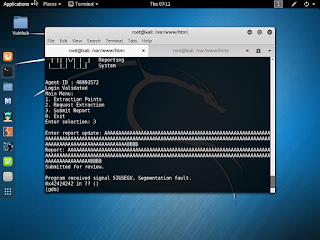
Now that we've confirmed we can write to EIP, let's see which registers are also overwritten. It looks like eax is holding a pointer to an array of data that was overwritten by our pattern so let's investigate that more thoroughly.

So again, we used pattern_create.rb to create a pattern and put it into the application, and then we use pattern_offset.rb to calculate the offset of the buffer! Which is....

...offset 0? That seems awfully nice. Now, I need to find someway to get code execution to eax. Fortunately, there is a site called ropshell that you can upload a binary to and it will give you back some options including one for 'call eax' located at offset 0x00000563. You need a little more computer architecture knowledge to know that this will be located at 0x08048563 in memory (most linux executables are loaded at base address 0x08048000). Lastly, we just need shellcode which is easily generated by msfvenom. Now we have the exploit!

Let's try and see if it works! So, this specific script didn't work, but the format stayed the same. I had to add some time delays and I switched from meterpreter shellcode to regular shellcode. Here is the actual script that worked followed by my root privs.


Well, now all that remains is to see the final flag and wrap up this walkthrough! Drum roll please......................

This was an awesome exercise and I'd like to give credit to all the website I used while researching how to exploit this box. I'd also like to say I did compare my walkthrough to the other walkthroughs already posted on Vulnhub.com and it was very fun to see alternate and similar techniques used. All thoughts and comments are the authors and do not represent the thoughts or comments of anyone else. I hope you enjoyed this walkthrough! -Hack Responsibly. Hack Professionally.
And now....onto the walkthrough....
After loading the image into VirtualBox, it showed up as 192.168.6.101 on my local network.


Now to base64 decode flag2...and we got 'imfadministrator' (no quotes). Again, I tried using the flag as path and this time it got us to a login prompt.

After password guessing for awhile (longer than I care to admit) I started googling for things along the lines of 'php password bypass'. Lots of SQLi pages came up but another page came up that said something along the lines of 'PHP password bypass for CTF'. *strokes beard*. After reading about this, apparently PHP does not do well with type conversions when comparing to zero and we can alter the POST request to send an array object instead of a string object for the password field and because of the type conversion issues, the php page will incorrectly allow us access.


The dump showed a new page that we hadn't seen before 'tutorials-incomplete' (no quotes). This page has a picture with a QR code. After scanning it, I got the fourth flag. The flag was 'uploadr942.php' so I navigated to that page next.
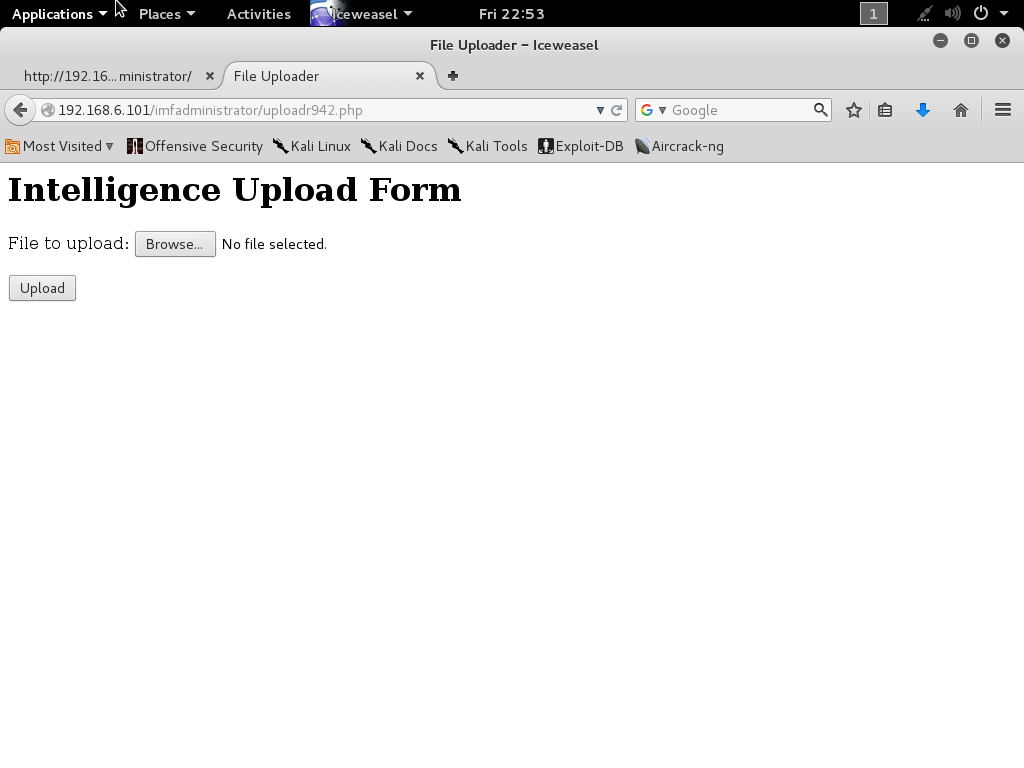
First I tried to upload a text file and got an invalid file type error. After trying a couple different formats, I finally found the jpg was accepted as a valid filetype. There isn't any information on where the picture was uploaded to so, I thought I'd try the obvious options /images and /uploads. /images returned a blank page and /uploads was forbidden. So it exists? Going back to the result there is a comment in the source code that didn't exist before; unique hash? Possible filename? The /images/<hash>.jpg was not found. /uploads/<hash>.jpg worked! Holy crap! Ok, so now I needed something I could use to execute code with so I grabbed a webshell included in Kali Linux and attempted to upload the webshell renamed with the .php.jpg extension. Unfortunately, this didn't work because 'CrappyWAF detected malware. Signature: fopen php function detected'. Well screw you too IMF.
The CrappyWAF also detected the 'system' function. ....seriously....and exec too....and shell_exec....and passthru...COME ON!
I found a stackoverflow page that listed out different ways to execute code via php and BACKTICKS seems to be working. I edited my php-webshell to use backticks instead of system/exec/whatever calls and I only got 'Error: Invalid file data' instead of CrappyWAF errors. Two steps forward, one step back. Now, how to make it look like valid data...
After trying for a couple hours I decide that jpg files are not going to work and I determine that png, bmp, and gifs are also acceptable formats. I used a technique I found online to write the magic number "FF D8 FF E0" to a fake gif file and then append straight php to the fake file. This FINALLY allows us to achieve code execution on the machine.

HAHAHAHA FINALLY! I can cat the fifth flag and move forward...

I am able to port knock the machine using nmap and then I can simply nc to the machine on port 7788 and the service is now available! So, from our php webshell I can 'cat' the contents of the 'agent' executable, but I need to find out what the Agent ID means.
First I copy the agent executable back to my local workstation and I run strings, nothing jumps out about the Agent ID but, I can see there are menu options that include Extraction Points, Request Extractions and Submitting a report. In addition, there are numerous cities and places, i'm assuming, to request an extraction.

After running into some issues and desiring a more robust prompt, I switched over to meterpreter and executed an msfvenom payload via the php backdoor shell and now have a meterpreter shell on the machine.

Finally, I am able to run ltrace on the agent executable and we can easily see the 'strncmp' call made with my provided value 'a' and the actual value needed '48093572'.

Ok now it looks like we have access to this executable and from our previous recon on the box we know this executable is running as root so, I think it's time to design a BUFFER OVERFLOW!!! *epic music*
So after a little fuzzing, I found that the Report (option 3) is able to be corrupted with a string length of 1024 "\x90"s so now, I need to find where the buffer overwrites EIP. To do this we can use pattern_create.rb. We found where EIP crashes and determined that the offset is 168 bytes into the buffer. To confirm this, we edit bytes 168-171 (inclusive) to be unique and when the program crashes, we should see our exact bytes that caused the application to crash.

Now that we've confirmed we can write to EIP, let's see which registers are also overwritten. It looks like eax is holding a pointer to an array of data that was overwritten by our pattern so let's investigate that more thoroughly.

So again, we used pattern_create.rb to create a pattern and put it into the application, and then we use pattern_offset.rb to calculate the offset of the buffer! Which is....

...offset 0? That seems awfully nice. Now, I need to find someway to get code execution to eax. Fortunately, there is a site called ropshell that you can upload a binary to and it will give you back some options including one for 'call eax' located at offset 0x00000563. You need a little more computer architecture knowledge to know that this will be located at 0x08048563 in memory (most linux executables are loaded at base address 0x08048000). Lastly, we just need shellcode which is easily generated by msfvenom. Now we have the exploit!

Let's try and see if it works! So, this specific script didn't work, but the format stayed the same. I had to add some time delays and I switched from meterpreter shellcode to regular shellcode. Here is the actual script that worked followed by my root privs.


Well, now all that remains is to see the final flag and wrap up this walkthrough! Drum roll please......................

This was an awesome exercise and I'd like to give credit to all the website I used while researching how to exploit this box. I'd also like to say I did compare my walkthrough to the other walkthroughs already posted on Vulnhub.com and it was very fun to see alternate and similar techniques used. All thoughts and comments are the authors and do not represent the thoughts or comments of anyone else. I hope you enjoyed this walkthrough! -Hack Responsibly. Hack Professionally.
Monday, July 18, 2016
Maybe it's...XOR obfuscation-eline
While I was spending some quality time with Metasploit and contemplating how I would conduct a pen test using obfuscated tools, I thought, "What is a simple way to obfuscate tools without using the Metasploit framework, msfvenom, or shikata_ga_nai?" Python script! A simple XOR might prevent a tool from being caught in a pinch. So, I wrote up a script and published it here along with some of my results after testing.
So, at first I wanted to make sure the script worked and I used test.txt, ran it through my python script using 'python xor_obfuscator.py -i test.txt -p john' and left the output file as the default value. Then, to double check that it worked, I ran 'python xor_obfuscator.py -i out.file -p john -o new.test.txt' and verified that it worked with md5 sum.


 As we can see, the 'test.txt' and 'new.test.txt' have the same md5sum but after obfuscating with password 'john' the md5sum changes. Now, let's try this with a meterpreter shell.
We're going to use msfvenom to create a simple meterpreter executable and we'll run it through VirusTotal to determine if it can still detect the executable.
Here we've created the meterpreter.exe and the hidden.exe.obf.

Interestingly enough, VirusTotal didn't do a great job detecting even the simple meterpreter payload but, some AVs did detect the meterpreter.exe file.

Now, after we scan the hidden.exe.obf file...
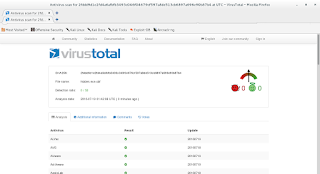 0% detection! This makes sense because the file virtually does not resemble an executable anymore nor could you execute it as such BUT, you could place this on a target and according to this it wouldn't be detected.
This is not a sophisticated method for hiding executables but it could work to avoid simple antivirus, firewall, and intrusion detection systems. Do with it what you will!
--EDIT-- 7/19/2016
I was able to add random password creation and execution via temporary files to my python script. Check out the updates at the same link as above but, here it is again: https://github.com/Quantumite/xor_obfuscator/
So, at first I wanted to make sure the script worked and I used test.txt, ran it through my python script using 'python xor_obfuscator.py -i test.txt -p john' and left the output file as the default value. Then, to double check that it worked, I ran 'python xor_obfuscator.py -i out.file -p john -o new.test.txt' and verified that it worked with md5 sum.


We're going to use msfvenom to create a simple meterpreter executable and we'll run it through VirusTotal to determine if it can still detect the executable.
Here we've created the meterpreter.exe and the hidden.exe.obf.

Interestingly enough, VirusTotal didn't do a great job detecting even the simple meterpreter payload but, some AVs did detect the meterpreter.exe file.

Now, after we scan the hidden.exe.obf file...

This is not a sophisticated method for hiding executables but it could work to avoid simple antivirus, firewall, and intrusion detection systems. Do with it what you will!
--EDIT-- 7/19/2016
I was able to add random password creation and execution via temporary files to my python script. Check out the updates at the same link as above but, here it is again: https://github.com/Quantumite/xor_obfuscator/
Subscribe to:
Posts (Atom)